
Use the models in your connection.
Select a Kimi model from the same picker you use for other providers. Its supported effort levels follow your selection.
 Kimi
Kimi  Visual Studio 2026
Bring your eligible Kimi Code subscription to your C# and .NET solution. Track your allowance, choose the reasoning effort, and use Kimi’s native web tools from your IDE.
Sign in through Kimi Code. Usage counts toward the allowance available with your account and plan.
How subscription access works ↗
01 / Usage & allowance
Open Show usage from the chat toolbar. Kimi Usage brings your account’s consumption and renewal times into Visual Studio.
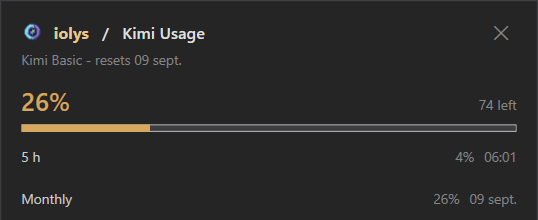
Values are examples from a connected account, not a live counter or an allowance included with iolys. Usage windows and limits depend on your Kimi account.
02 / Models & reasoning effort
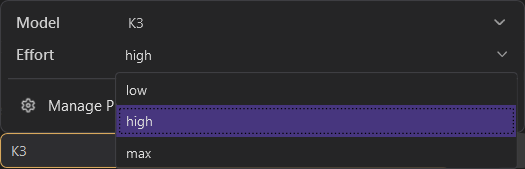
Open the model options beside your prompt to choose Kimi’s reasoning effort. The available levels come from the selected model.
“Trace this failing integration test across the solution and propose a fix.”
Choose the model and reasoning effort before starting the task.Available models and effort levels depend on your Kimi connection. Keep the locally managed Kimi CLI up to date in Manage Providers to use supported effort controls.
03 / Native web tools
Kimi’s native WebSearch and FetchURL tools are enabled in the integration. Bring web research and relevant documentation into the conversation alongside your solution’s context.
Ask Kimi to search the web for documentation or information relevant to an issue you are investigating.
“Find the official ASP.NET Core documentation for this error and explain the recommended fix.”
Give Kimi a public URL to retrieve and read. Use a documentation page or release note as context for your next change.
“Read this library’s migration guide and identify the changes needed in my project.”
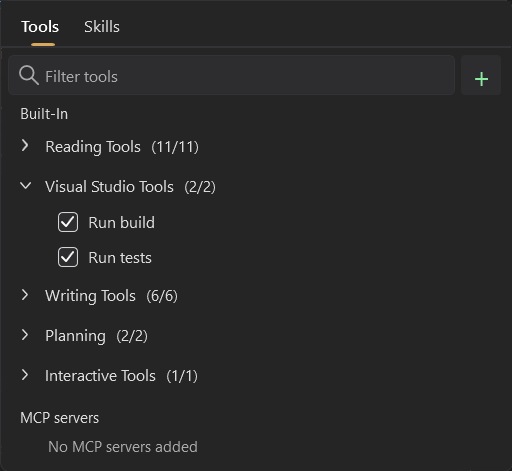
Kimi also uses the tools provided by iolys to read and edit code, run builds, and run tests. Open Tools and Skills beside the prompt to inspect the available IDE tools.
Connect Kimi
Download the CLI locally, connect your account, and keep versions and updates in the same panel.
Open Manage Providers in iolys and add or select Kimi.
Download the locally managed CLI from the provider panel, then sign in with your Kimi account.
Choose your Kimi model and a supported effort level, then start from your Visual Studio solution.
Install the iolys extension for Visual Studio 2026 and open your C# solution. Open Manage Providers in iolys and add or select Kimi. Download the locally managed CLI from the provider panel, then sign in with your Kimi account. Choose your Kimi model and a supported effort level, then start from your Visual Studio solution. You can then ask Kimi to help with your C# and .NET code from the iolys workspace.
Yes. iolys is a VSIX extension for Visual Studio 2026, and Kimi is one of the provider connections it ships with. Install the iolys VSIX once from the Visual Studio Marketplace, then add Kimi from the Manage Providers panel; there is no separate VSIX per provider.
Yes. Sign in through Kimi Code with an account whose plan includes CLI access. iolys uses that eligible access inside Visual Studio 2026, and usage counts toward your Kimi account’s allowance.
Yes, with the iolys extension. It connects Kimi Code to Visual Studio 2026 through the provider CLI, using the eligible access on your Kimi account.
Yes. Open Show usage from the chat toolbar. Kimi Usage shows your plan, monthly usage percentage, remaining allowance, and the usage windows and reset times reported by your account. The capture shows a five-hour window and a monthly window; limits depend on your Kimi account.
Yes, for models that publish graded effort levels. Open the model options beside the prompt. K3 in the capture offers low, high, and max. iolys reads the supported levels from Kimi’s model catalog and hides the effort selector for models without those options.
Yes. Kimi’s native WebSearch and FetchURL tools are enabled in the integration. They let Kimi search for relevant information and read public pages alongside the IDE context and tools provided by iolys.
Yes. Kimi connects to the tools supplied by iolys, including reading and editing code, running builds, and running tests. Open Tools and Skills beside the prompt to inspect the available IDE tools.
Open Manage Providers and select Kimi. iolys downloads and manages its own local CLI installation from this panel. Keep it up to date to use the effort controls supported by your model and CLI version.
Yes. Kimi can sit alongside cloud APIs, local Ollama models, and other provider CLIs.
Explore other providers for Visual Studio 2026
Keep your active solution, provider access, and development workflow.
Get iolys for Visual Studio 2026 OpenRouter
 OpenCode Go
 OpenCode Zen