
Start with the task.
Search by name, model ID, or description. Filter free and paid models, narrow the context window to 32K+, 128K+, or 1M+, and check tool support.
 OpenRouter
  Visual Studio 2026
Connect OpenRouter to your C# and .NET workspace with your own API key. Choose from the models available to your account, work with images and native web tools, and keep your API spending in sight.
Your API key. Your OpenRouter account.
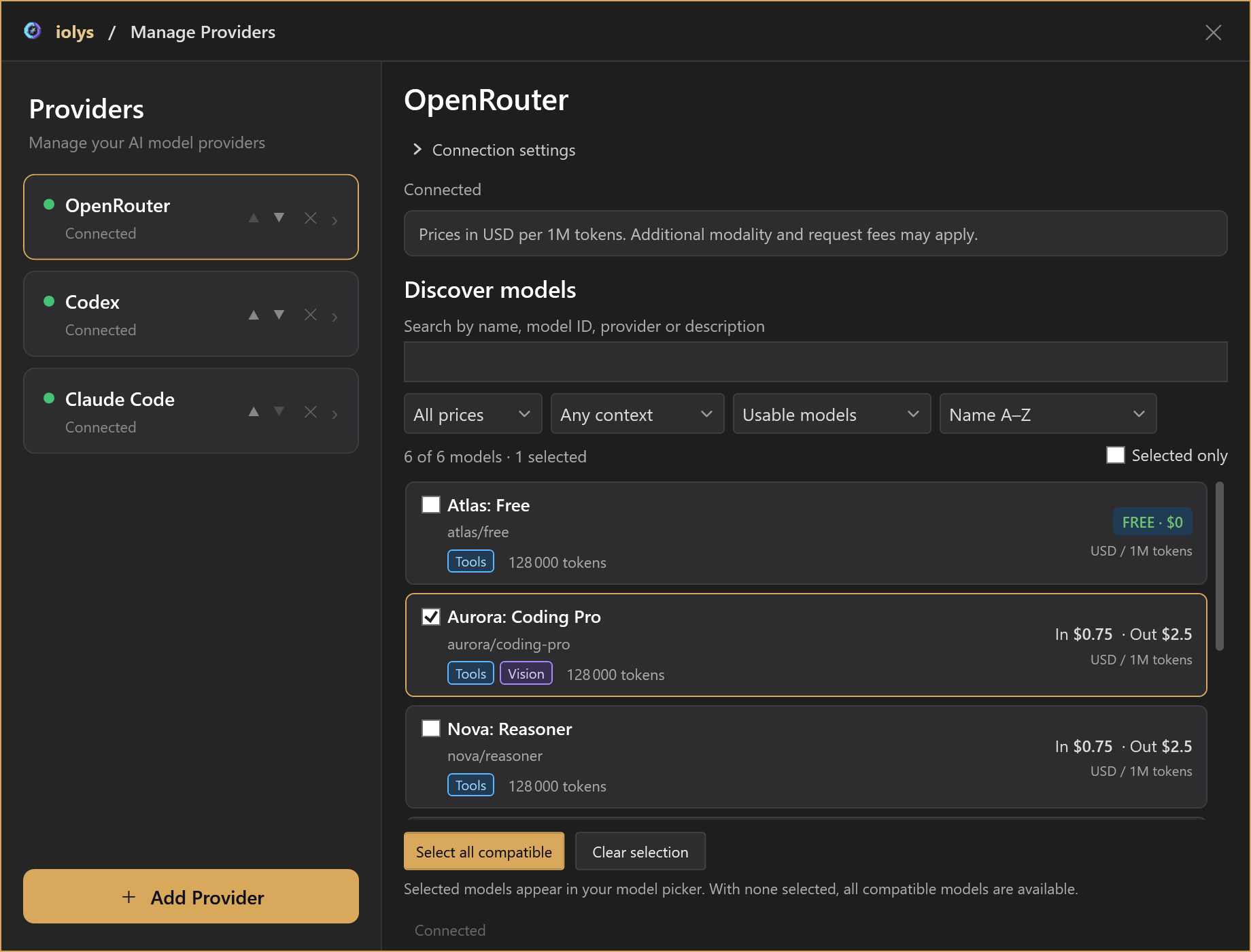
Product UI shown with demonstration data. Models, capabilities, prices, and balances depend on your OpenRouter account.
01 / Models & reasoning
Discover the models available to your account, compare what matters, and pin the ones you want beside your prompt in Visual Studio 2026.
Search by name, model ID, or description. Filter free and paid models, narrow the context window to 32K+, 128K+, or 1M+, and check tool support.
Read capability badges and input/output prices in USD per million tokens. Sort by price, largest context, newest, or name.
Pin individual models or select all compatible models. Your pins stay selected as you change filters. With none pinned, all compatible models are available.
The catalog reflects account credit and API key limits. If credit is exhausted or cannot be verified, discovery shows only free models. Use Test Connection to refresh after a balance or limit change.
02 / Image inputs
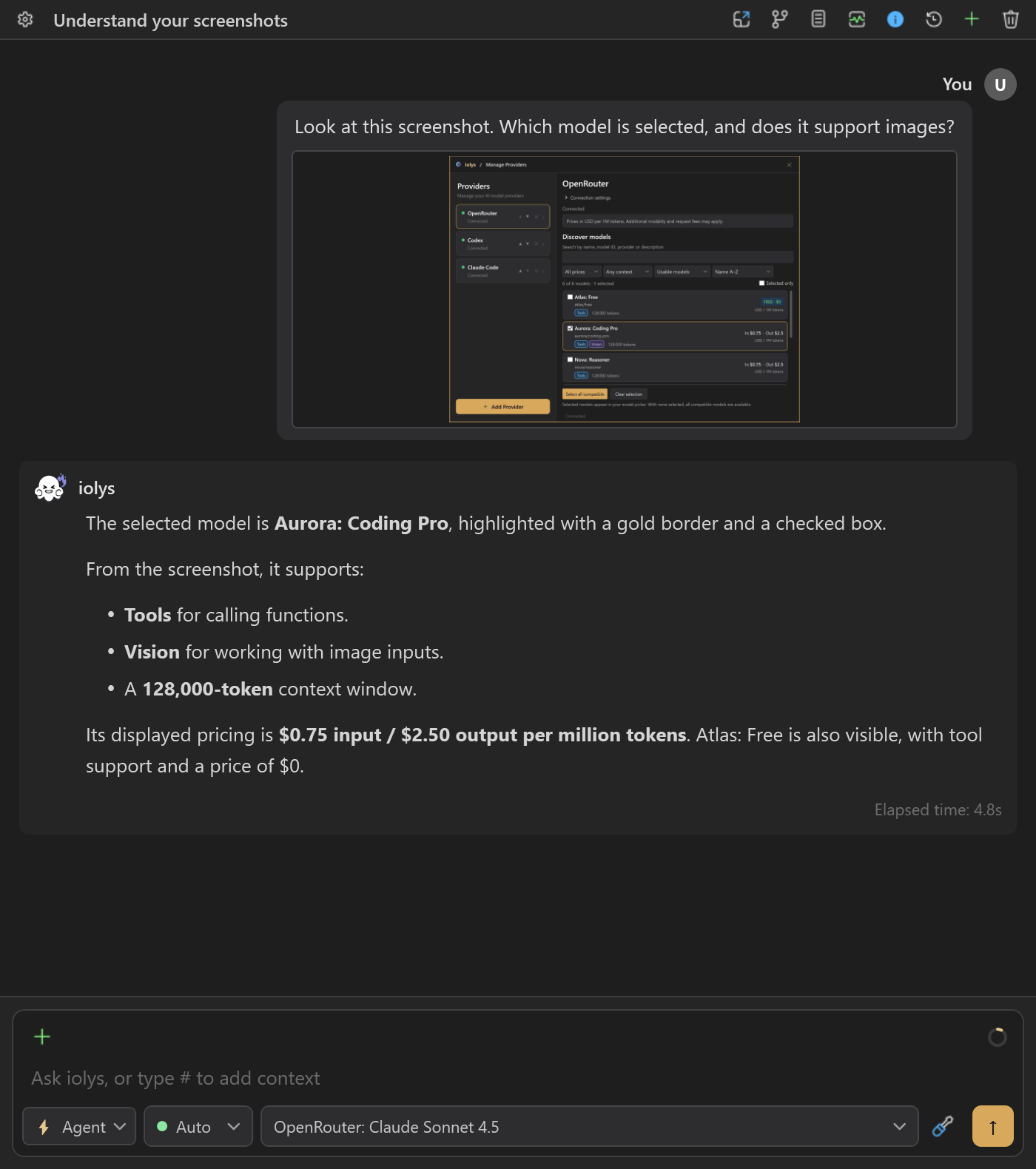
A screenshot can explain what a description misses. Attach a UI capture, diagram, or error image and ask a Vision model to inspect it alongside your task.
“Review this settings panel. Suggest improvements to spacing, labels, and contrast for my C# desktop app.”
03 / Native tools
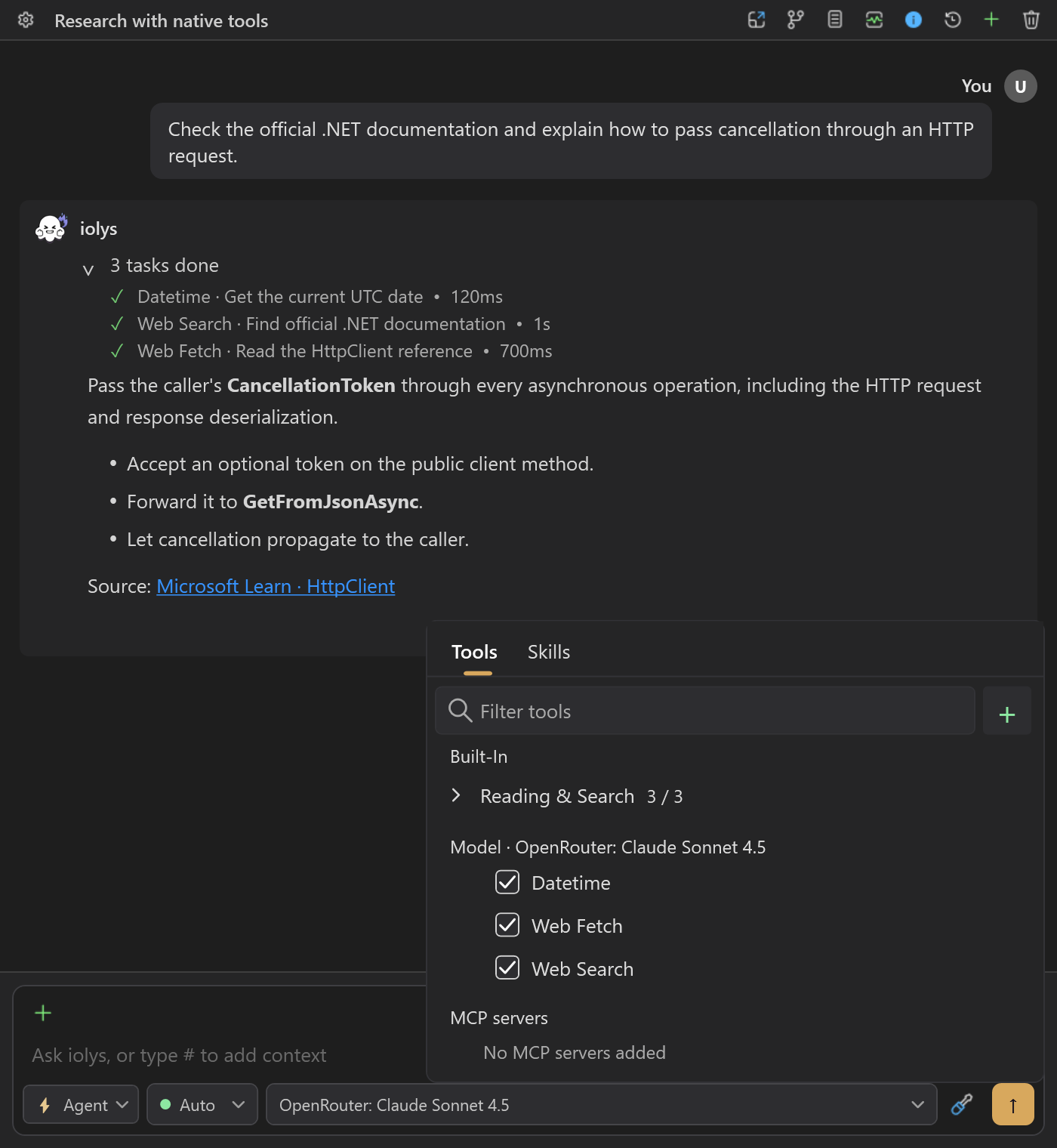
Bring documentation and current information into the conversation beside your C# or .NET solution. OpenRouter’s native tools work alongside the workspace and MCP tools available in iolys.
Enable or disable each entry under Model Tools. Tool availability follows the model’s support and your active agent’s selection.
Native server tools are an OpenRouter beta feature and may incur additional charges. Workspace and MCP tools keep their own permission rules.
04 / Credit & budgets
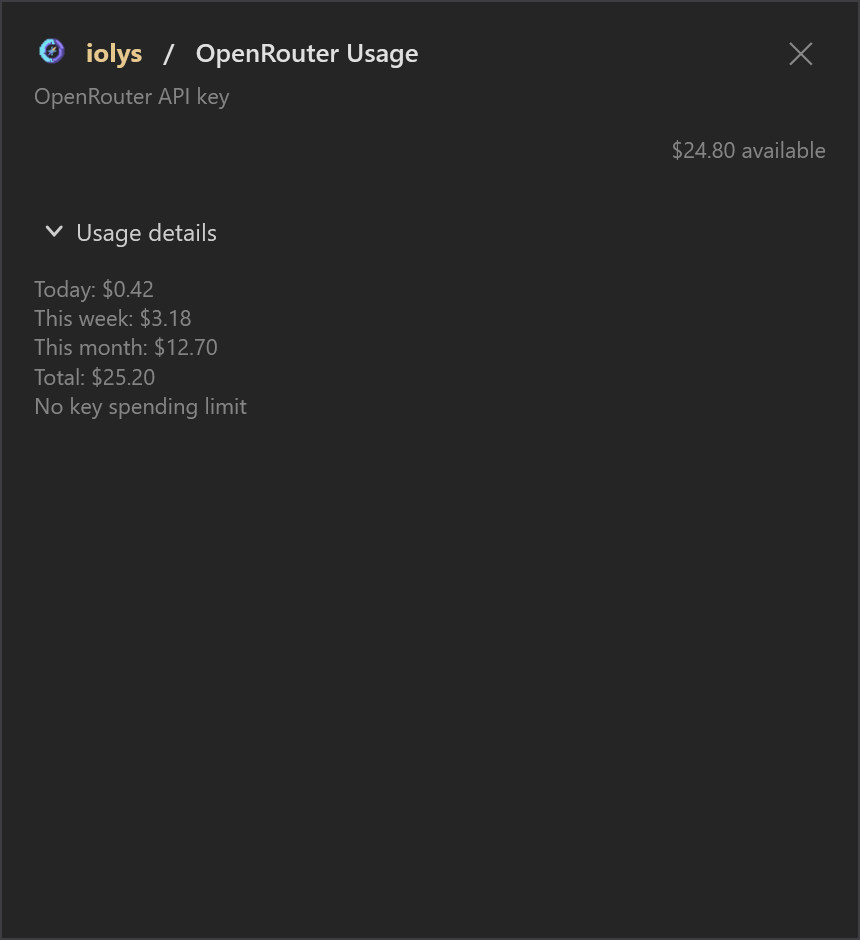
Open Usage to check account credit and the spending reported for your API key, without leaving Visual Studio.
See remaining account credit alongside today’s, this week’s, this month’s, and total key spending. A key without a spending cap is clearly marked.
When your key has a budget, see its consumed percentage, remaining allowance, and reported reset period. The progress bar measures the key’s budget.
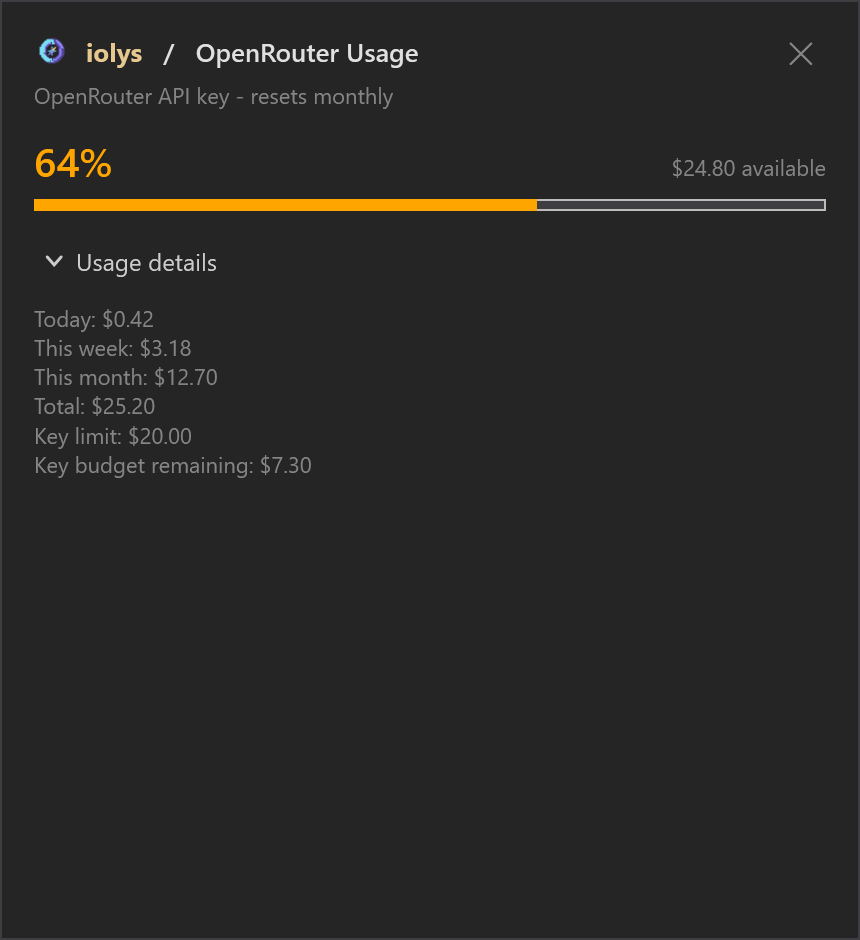
Account credit can remain available after a key reaches its limit. Missing amounts appear as unavailable. Reported BYOK spending is included in the details when present; BYOK configuration stays in your OpenRouter account.
05 / Conversation costs
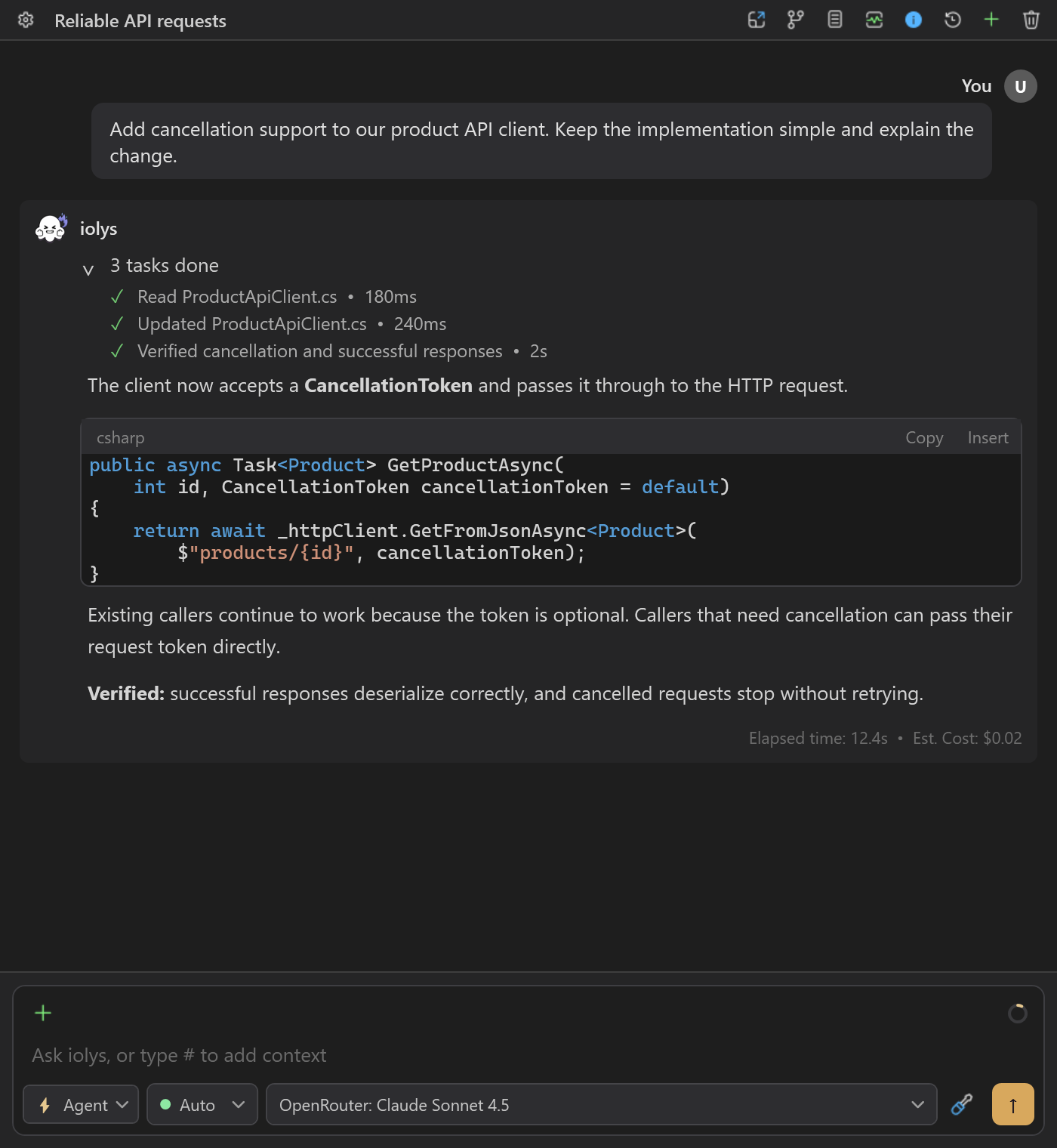
Follow API spending where the work happens. The Est. Cost indicator can appear beside a completed turn’s duration, with more detail on hover.
Missing usage can make totals incomplete; no displayed amount does not necessarily mean a free request. Conversation totals are separate from account billing. The shared tooltip mentions public list prices, but OpenRouter amounts come from API-reported costs.
Connect OpenRouter
Connect your own OpenRouter account, choose your models, and return to your solution in Visual Studio 2026.
Create or retrieve an API key from your OpenRouter account.
Open Manage Models in iolys, choose Add Provider, select OpenRouter, and enter your API key. The endpoint is already configured. Use Test Connection to check access and refresh the catalog.
Pin the compatible models you want in the conversation picker, then choose an OpenRouter model and start a task in your C# or .NET solution.
Install the iolys extension for Visual Studio 2026 and open your C# solution. Create or retrieve an API key from your OpenRouter account. Open Manage Models in iolys, choose Add Provider, select OpenRouter, and enter your API key. The endpoint is already configured. Use Test Connection to check access and refresh the catalog. Pin the compatible models you want in the conversation picker, then choose an OpenRouter model and start a task in your C# or .NET solution. You can then ask OpenRouter to help with your C# and .NET code from the iolys workspace.
Yes. iolys is a VSIX extension for Visual Studio 2026, and OpenRouter is one of the provider connections it ships with. Install the iolys VSIX once from the Visual Studio Marketplace, then add OpenRouter from the Manage Providers panel; there is no separate VSIX per provider.
Yes, with the iolys extension. It connects OpenRouter to Visual Studio 2026 with your own API key and brings the models available to your account into the active C# or .NET solution. Model discovery, conversations, supported image inputs, native web tools, and usage reporting all stay inside the IDE.
Yes. Add OpenRouter in Manage Models and enter your own API key. The endpoint is preset, and usage stays attached to your OpenRouter account. iolys protects stored credentials with Windows encryption for your Windows user account.
Search by name, model ID, or description; filter by price, context size, and tool support; then pin your preferred models. With no models pinned, all compatible available models appear in the conversation picker. Filtering does not remove existing pins.
Paid models require available account credit and an API key whose spending limit allows them. If credit cannot be verified, discovery shows only free models and asks you to retry Test Connection. Free models still have OpenRouter usage limits.
Yes, with a tool-capable model that advertises Vision support. Attach PNG, JPEG, GIF, or WebP images up to 20 MiB per file. The selected model may impose additional restrictions. This is image input for a conversation, not image generation.
Yes, when the selected model explicitly advertises supported effort levels. Available choices and defaults follow that model's metadata. Generic reasoning support alone does not enable the selector.
Web Search finds current information, Web Fetch reads web URLs, and Datetime retrieves the current UTC date and time. Each can be disabled independently. Availability follows model tool support and the active agent's tool selection. These upstream beta tools may incur additional charges.
Account credit is the balance available in your OpenRouter account. A key budget is a separate spending cap for the configured API key. The progress bar shows consumption of that key budget, not account credit. An unlimited key can still belong to an account with no credit.
iolys accumulates the monetary costs reported by OpenRouter across model calls in a turn, rather than multiplying catalog prices by token counts. The Est. Cost display can include token details and a session total. Missing usage can make the total incomplete, and a missing amount does not prove a request was free. The shared tooltip's public-list-price wording does not describe the OpenRouter calculation.
No. The integration provides model discovery, conversations, supported image inputs, native tools, and usage reporting. Routing preferences, fallback chains, and BYOK setup are not configured in this panel. Existing BYOK spending can appear in Usage when OpenRouter reports it.
Explore other providers for Visual Studio 2026
Keep your active solution, provider access, and development workflow.
Get iolys for Visual Studio 2026 OpenCode Go
 OpenCode Zen
 Databricks Unity Catalog