
The tools around your agent
AI coding capabilities
for Visual Studio.
Connect your tools, run independent tasks in parallel, and reuse the way your team works. iolys gives your AI agent the context and tools to take a C# or .NET task from investigation through code changes, builds, tests, and review in Visual Studio 2026.
MCP tools
Bring your services into the conversation.
Model Context Protocol (MCP) connects your agent to tools from services such as documentation systems, issue trackers, or databases. Add a server from a registry or configure your own connection, then choose which tools to enable. Calls remain subject to your permissions and the selected model's tool support.
MCP tools documentationParallel workspaces & worktrees
Give independent tasks their own space.
Work on a bug fix and an unrelated feature at the same time, each in its own Git worktree and branch. Open each workspace in a separate Visual Studio instance to keep files and build state apart. New branches start from the current commit, so commit any starting changes they need. Review and integrate each branch when it is ready.
Parallel workspaces & worktrees documentation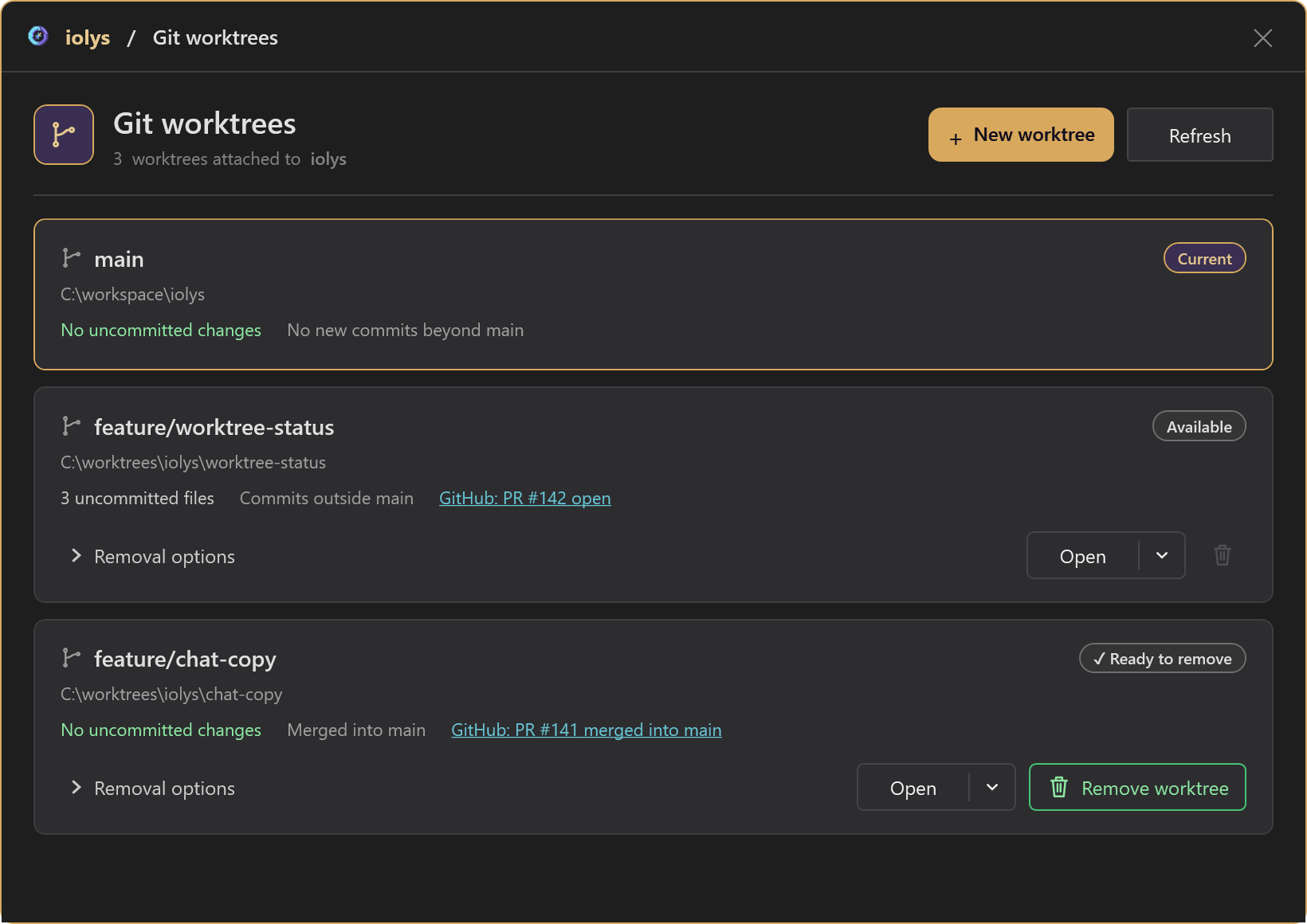
Custom agents
Set up a specialist you can use again.
Create a code reviewer, test writer, or implementation agent with a reusable role, instructions, and selected tools. The guided creator helps you define it from chat. Keep an agent in your workspace to share it through Git, or save it globally for your other projects. Its tools still follow your permission settings.
Custom agents documentationAgent skills
Reuse your team's working methods.
Package a repeatable workflow in a SKILL.md file with the reference files, scripts, or assets it needs. Create a skill from chat or import an existing folder, then select it for a task. Workspace skills can travel with your repository. Loading a skill supplies instructions; it does not grant permission to execute its scripts.
Agent skills documentationPermissions & control
Choose when the agent should ask.
Use Interactive to approve edits and ordinary commands, Auto for routine workspace work, or Full Access for fewer restrictions. Control individual tools, managed Git and GitHub rights, and MCP server execution. Tool-specific blocks and mandatory confirmations still apply in Full Access. Inspect tool activity and revoke session grants when needed.
Permissions & control documentationGitHub integration
Take an issue through to a pull request.
Connect GitHub to read issues, inspect pull requests and their checks, and create or update a PR from chat. iolys guides you through its managed GitHub CLI setup and browser sign-in. Operations are scoped to your workspace's repository and follow its permissions. Linked PR status also appears on worktree cards when available.
GitHub integration documentationBuild, test & review
Give the agent feedback from your solution.
Let the agent inspect projects, read compiler errors and warnings, discover tests, and run builds and selected tests. It can use the results to refine a change in the same conversation. Review the file diffs and validation results in Visual Studio before you commit.
Build, test & review documentationOne development workflow
From a request to a reviewed change.
Start with a solution in Visual Studio 2026 and a connected model that supports tools. Enable the tools the task needs. Git is required for separate worktrees; available actions also depend on the provider, chat mode, agent, and permissions.
- 01
Set the scope
Describe the expected outcome and relevant code. Choose a custom agent or skill when you have a reusable approach. Use a separate worktree for an independent task.
- 02
Make and check the change
Let the agent inspect the solution, use enabled tools, and make the change. Ask it to build and run the relevant tests, then address the failures it finds.
- 03
Review and share
Inspect the diff and results. When ready, ask for a commit, a push, and a pull request. Review each branch and verify the combined result after integration.
Put your next .NET task in motion.
Bring these capabilities to the solution you already work on in Visual Studio 2026.
Install iolys for Visual StudioShare your workflow
Have a question about agents, tools, or parallel work? Join us on Discord to ask questions and suggest improvements.