
Keep your picker focused.
Choose which models appear in chat from the Go connection panel. Select the active model beside your prompt whenever you start a task.
 OpenCode Go
  Visual Studio 2026
Bring your OpenCode Go or Go Plus subscription to your C# and .NET workspace. Connect with your API key, choose your coding models, and keep your remaining allowance in view.
Your requests use your Go subscription allowance. iolys connects directly to the Go service.
How subscription access works ↗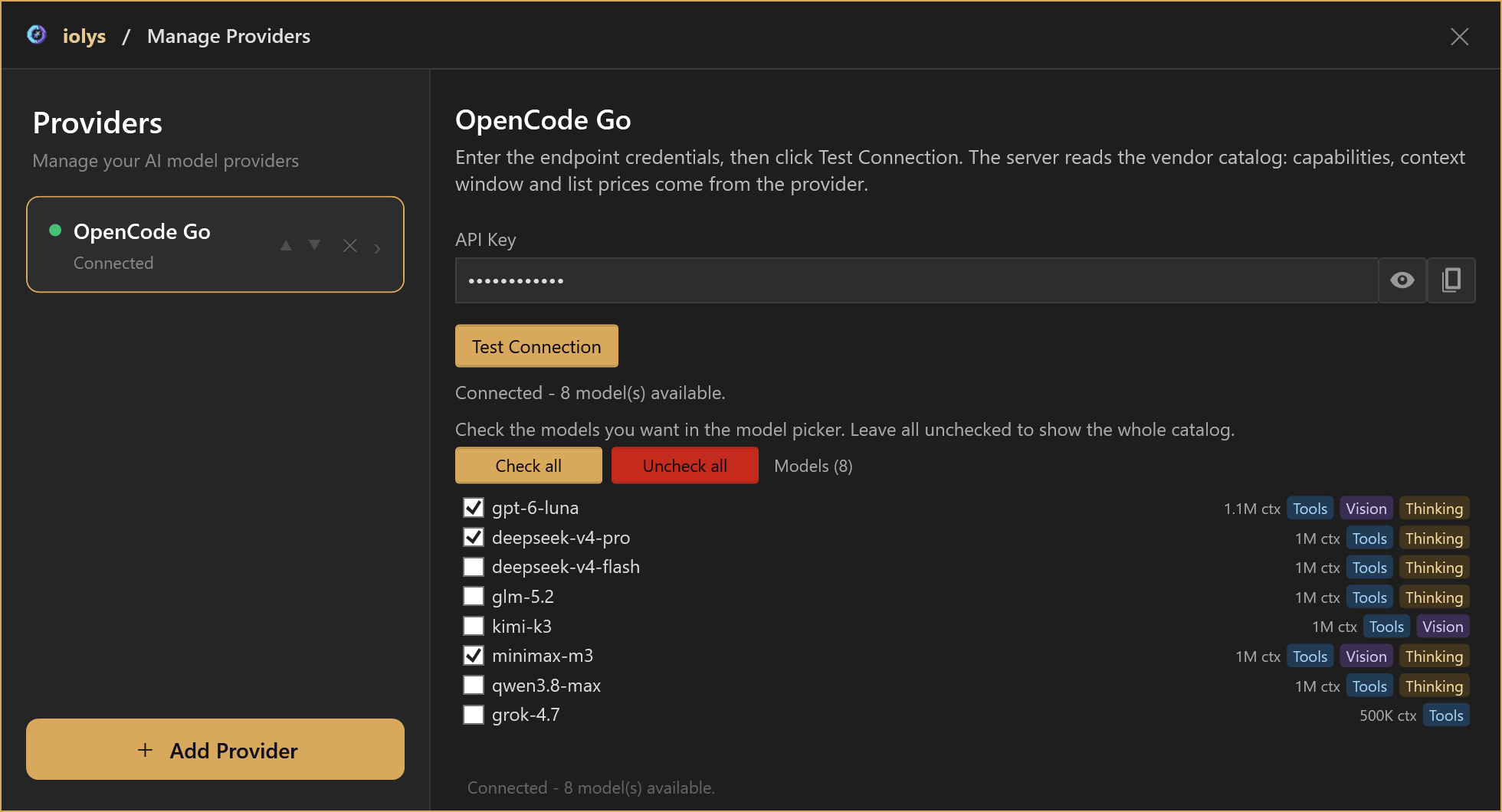
Product UI rendered with demonstration data. The captures show no live conversation or account. Model availability and allowances depend on your OpenCode account.
01 / Your model shortlist
Keep the Go models you use for implementation, code review, and debugging in your chat picker. Available families include GPT Luna, DeepSeek, GLM, Kimi, MiniMax, and Qwen, following OpenCode’s current catalog.
Choose which models appear in chat from the Go connection panel. Select the active model beside your prompt whenever you start a task.
Use the catalog’s capability badges and known context limits to guide your choice. Compatible models can use iolys tools for your solution and accept image attachments.
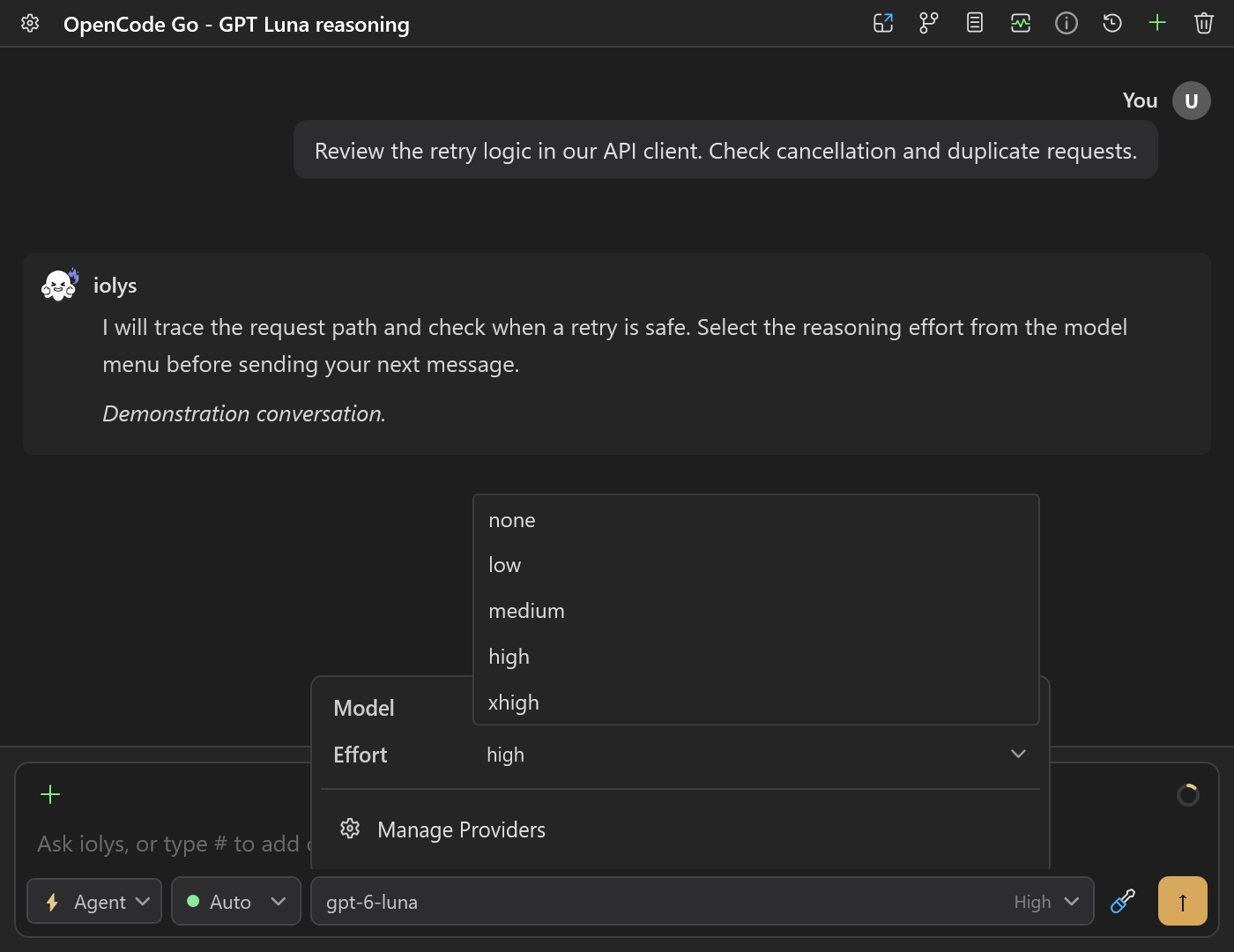
02 / Reasoning effort
Choose the reasoning effort in the chat model picker. The available levels follow the model you select.
The initial effort is High for the other listed models. Models without an effort selector use their server-side reasoning behavior.
03 / Context window
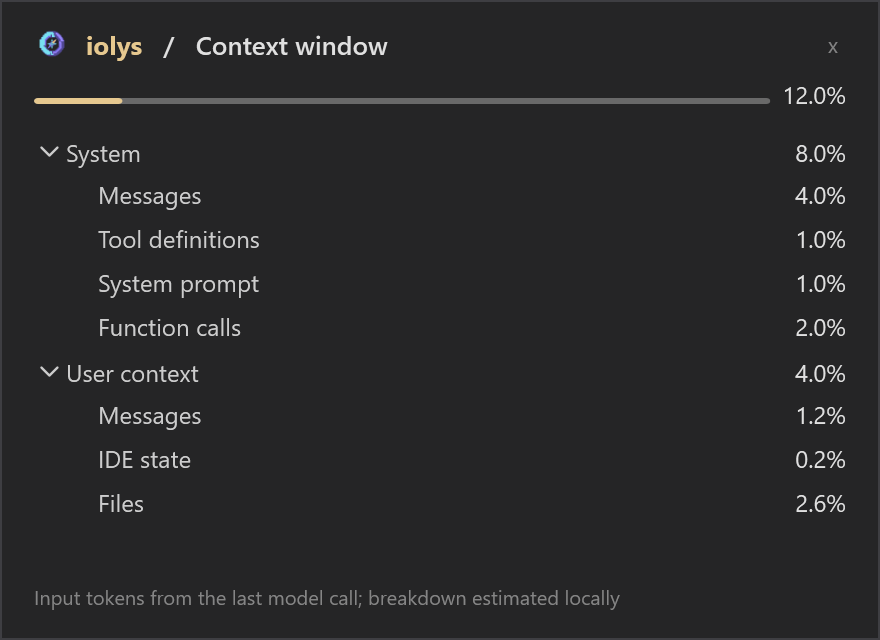
Open the context gauge to see how much of the selected model's known context window is in use, with a breakdown of messages, tools, IDE state, and files.
Context usage measures the input sent to the model. Your subscription allowance is tracked separately in Usage.
04 / Account usage
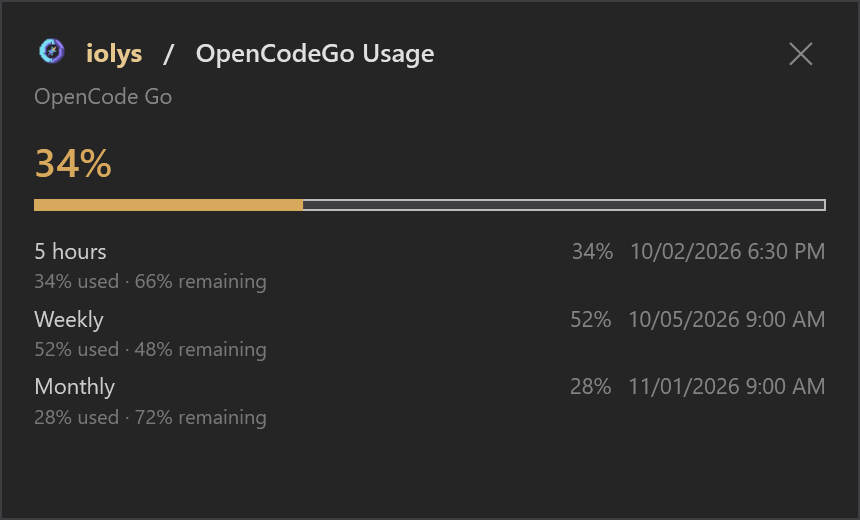
Open Usage from the chat to read the consumption reported for your OpenCode account, without leaving Visual Studio.
Only the counters reported by OpenCode are shown. The usage endpoint does not report a monetary balance or identify whether your subscription is Go or Go Plus.
Connect OpenCode Go
Connect your OpenCode Go or Go Plus account, choose your models, and start your next C# or .NET task.
Sign in to the OpenCode Console, subscribe to Go or Go Plus, and copy your API key.
Open Manage Models in iolys, choose OpenCode Go, paste your key, and run Test Connection. iolys configures the Go endpoint automatically.
Choose the models to show in the chat picker, then select a model and a supported reasoning effort for your Visual Studio conversation.
Install the iolys extension for Visual Studio 2026 and open your C# solution. Sign in to the OpenCode Console, subscribe to Go or Go Plus, and copy your API key. Open Manage Models in iolys, choose OpenCode Go, paste your key, and run Test Connection. iolys configures the Go endpoint automatically. Choose the models to show in the chat picker, then select a model and a supported reasoning effort for your Visual Studio conversation. You can then ask OpenCode Go to help with your C# and .NET code from the iolys workspace.
Yes. iolys is a VSIX extension for Visual Studio 2026, and OpenCode Go is one of the provider connections it ships with. Install the iolys VSIX once from the Visual Studio Marketplace, then add OpenCode Go from the Manage Providers panel; there is no separate VSIX per provider.
Yes. Connect your OpenCode Go or Go Plus API key to the dedicated OpenCode Go provider in iolys. Usage counts toward your OpenCode account's allowance. No OpenCode CLI installation is required for this connection.
No. Go is OpenCode's subscription service, while Zen is its separate pay-as-you-go service. The dedicated iolys provider uses Go's catalog and endpoints. OpenCode manages plan limits and any account-level option to use a balance beyond those limits.
Use Manage Models to configure your API key and the models visible in chat. Select the active model and its reasoning effort in the chat model picker. Test Connection refreshes the available catalog.
GPT-6 Luna and GPT-5.6 Luna offer none, low, medium, high, and xhigh; DeepSeek V4 offers low, medium, high, and max; GLM-5.2 offers high and max; MiniMax M3 offers none and thinking. Other models keep their server-side reasoning behavior without an effort selector. Available choices depend on the selected model.
Yes, when the selected model advertises the required capabilities. Models with image input support can receive image attachments, and tool-capable models can use the tools supplied by iolys for your solution. Capabilities and known context limits are shown from the model catalog.
The Usage window shows the five-hour, weekly, and monthly percentages, remaining percentages, reset times, and reached limits reported for your account. It includes usage from other clients. Only the counters reported by OpenCode are shown; the endpoint does not report a monetary balance or identify whether your plan is Go or Go Plus.
Explore other providers for Visual Studio 2026
Keep your active solution, provider access, and development workflow.
Get iolys for Visual Studio 2026 OpenCode Zen
 Databricks Unity Catalog
 Gemini